Pure Data
Overview
Use [openscofo~] to follow a score from a mono signal, report event/BPM, deliver actions to Pd receivers, and optionally output descriptors.
| Object | Use |
|---|---|
[openscofo~] | score following |
[openscofo~ rms centroid mfcc] | score following plus descriptor output |
Installation
Install the Pure Data external (Open Pd -> Tools -> Find Externals, search and install openscofo~) from the OpenScofo release matching your platform, then restart Pd if needed.
Minimal Example
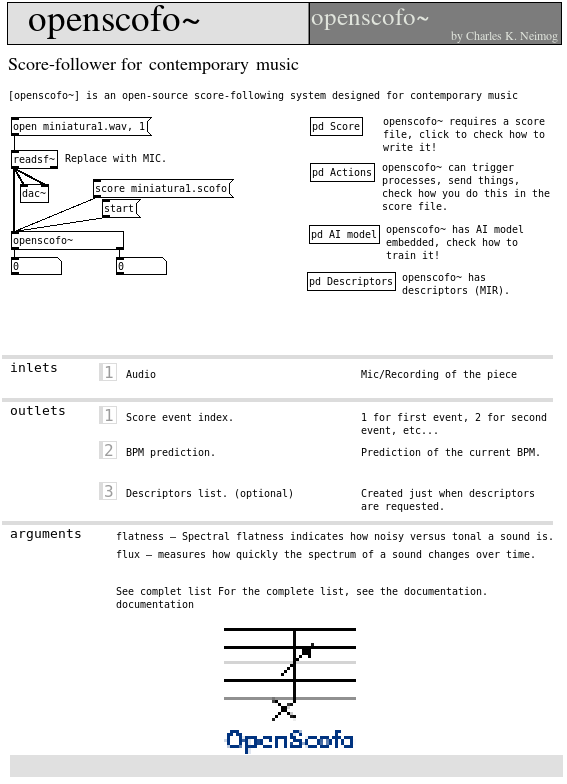
After install openscofo~:
- Create a new patch;
- Create an
openscofo~object; - Go to help of
openscofo~object.
Reference Table
Messages / API
| Message | Purpose |
|---|---|
score <path> | load a .scofo file |
start | reset to event 0 and start following |
follow 1, follow 0 | enable or disable following |
section <name> | silently reset following to a section; only the BPM outlet is updated |
set verbosity <0..3> | set console logging level |
set description <0 or 1> | enable descriptor-only processing |
set onnxmodel <path> <descriptors...> | load an ONNX model with descriptor order |
get descriptors <array> <sample-rate> [start] | analyze one FFT window from a Pd array |
Outlets:
| Outlet | Output |
|---|---|
| left | current score event index |
| middle | current BPM |
| right | descriptor messages, only when descriptors are requested |
Score Actions
Receive in Pd:
No-argument sendto sends a bang; arguments are sent as a Pd list. For shared action syntax, see Computer Actions.
Descriptors
Request descriptors as creation arguments:
Vector descriptors such as mfcc, chroma, logmel, and magnitude output lists. Scalar descriptors output one float.
Complete Example
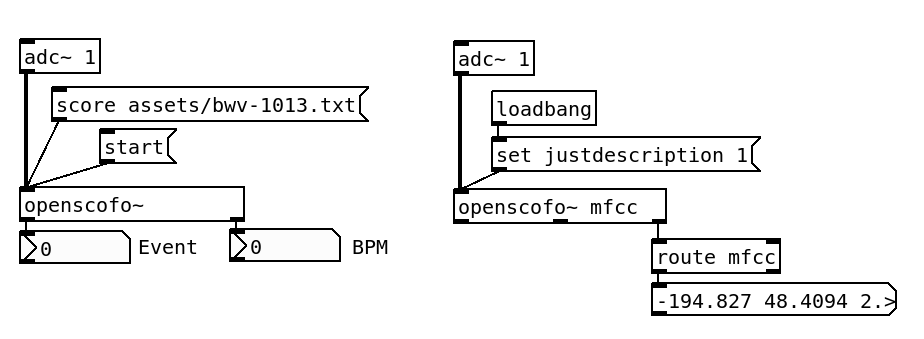
See Your First Interactive Patch for the smallest complete patch.
Remarks
Lua actions run when the external is built with Lua support. Inside LUA { ... }, use the pd module; see Lua.