AI Model Reference
Use this page to train or configure a model for extended techniques and other labeled sound categories.
For the composer-facing entry point, start with AI Models.
OpenScofo models recognize labeled sounds from audio descriptors: extended techniques, breath, key clicks, body percussion, vocal noises, or other non-standard performance gestures. Train the model on the same labels and descriptor order you will use in the score.
Reference Table
| Step | Requirement |
|---|---|
| Collect samples | short, isolated, representative .wav or .aif files |
| Organize labels | one folder per technique or sound class |
| Choose descriptors | use the same descriptor order in training and inference |
| Train | export an ONNX model for ONNXMODEL |
Dataset Structure
Each subfolder is a class label:
Flute/
├── jet_whistle/
│   ├── jet-whistle_01.wav
│   ├── jet-whistle_02.wav
│   ├── jet-whistle_03.wav
│   └── ...
├── key_click/
│   ├── Fl-key_click_A#4.wav
│   ├── Fl-key_click_A4.wav
│   ├── Fl-key_click_F#4.wav
│   ├── Fl-key_click_F4.wav
│   ├── Fl-key_click_G#4.wav
│   └── ...
├── pizzicato/
│   ├── Fl-pizzicato_A#4.wav
│   ├── Fl-pizzicato_A4.wav
│   ├── Fl-pizzicato_B3.wav
│   └── ...
└── tongue_ram/
    ├── Fl-tongue_ram_A3.wav
    ├── Fl-tongue_ram_B3.wav
    ├── Fl-tongue_ram_C#3.wav
    └── ...
Feature Extraction
After preparing the dataset, choose the descriptors used for training.
Common feature set:
- MFCC
- Log-mel spectrogram features
- Spectral centroid
- Spectral flatness
- High-frequency ratio
- Spectral flux
- Zero-crossing rate
- Irregularity
Adjust the set for the instrument and recording conditions, but keep training and inference consistent.
Training Procedure
Once the dataset and feature set are defined:
- Load all audio files from the dataset structure
- Extract the selected audio descriptors
- Train a Random Forest classifier
- Save the trained model for inference in
OpenScofo
Remarks
- The quality of classification depends more on dataset quality and consistency than on model complexity.
- Balance labels when possible. A dataset with 80
tongue-ramsamples and onejet-whistlesample is biased.
Training Tools
For now you can use Pure Data or Python to train these models.
Pure Data
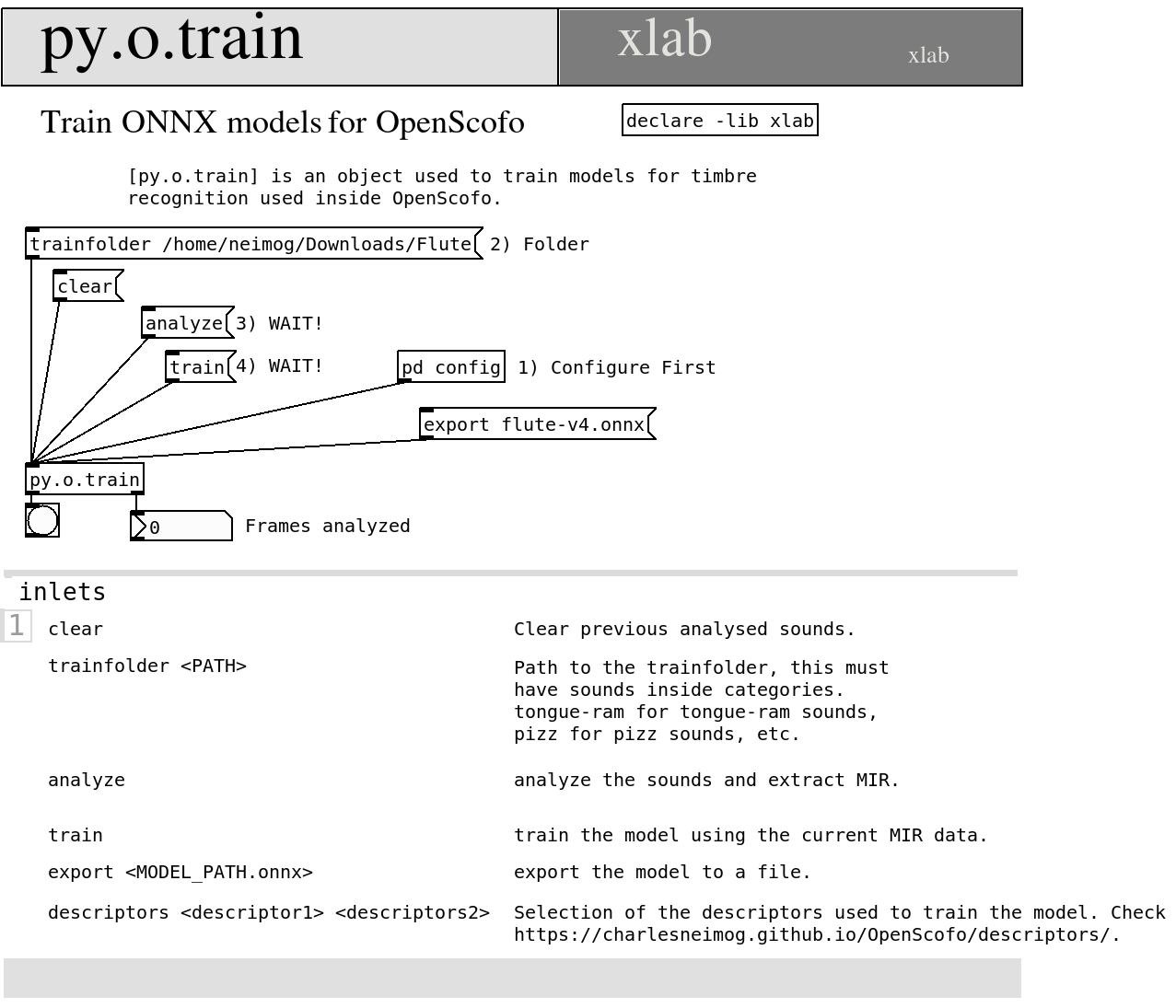
Use py4pd with py.o.train:
- Install the latest Python from python.org.
- In Pure Data, choose Tools > Find Externals, search for
py4pd, and install it. - Add
declare -lib py4pdand createpy.o.train. - Open the
py.o.trainhelp patch.
Python
In Python, use OpenScofo.ExtendedTechniqueClassifier:
import OpenScofo

# sample_rate, fft_size and hop_size must be the same you will use in the score
trainer = OpenScofo.ExtendedTechniqueClassifier(
    sample_rate=48000,
    fft_size=2048,
    hop_size=512,
    model_type="catboost",  # or "lightgbm"
)

#       ONNXDESCRIPTORS mfcc logmel centroid flatness hfr flux zcr irregularity kurtosis
trainer.set_descriptors(
    [
        "mfcc",
        "logmel",
        "centroid",
        "flatness",
        "hfr",
        "flux",
        "zcr",
        "irregularity",
        "kurtosis",
    ]
)
trainer.set_train_folder("/home/neimog/Downloads/Flute")

# Impulse Responses are good to prevent overfit.
trainer.set_ir_folders(["/home/neimog/Nextcloud/MusicData/Impulse_Responses/05_Halls/"])
trainer.analyze()
trainer.train()
trainer.export_model("flute-v5.onnx")
Score Example
Example score using a trained model:
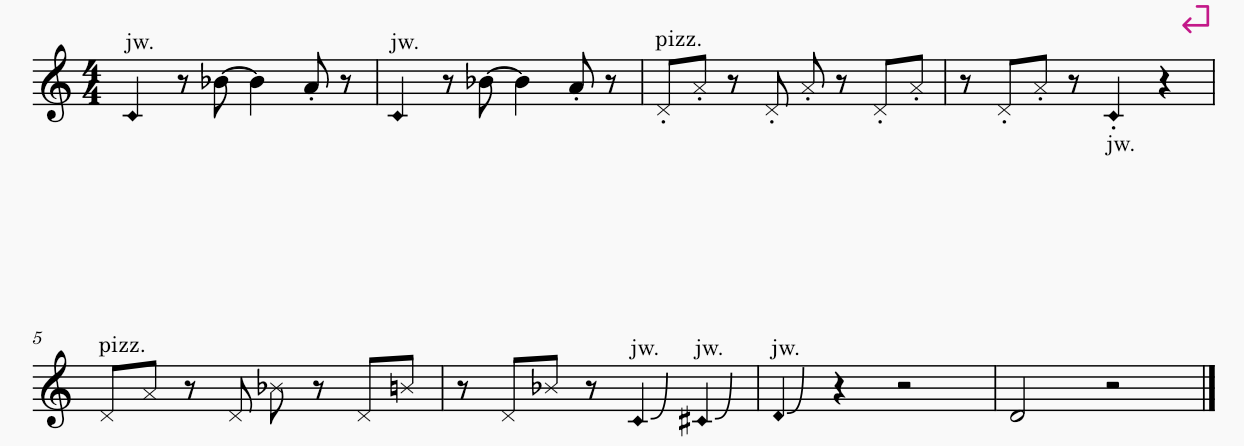
OpenScofo score:
/* Generated by OpenScofo online editor */

BPM 80

// Model Exported
ONNXMODEL flute-v5.onnx

// Descriptors used for train (exact same order)
ONNXDESCRIPTORS mfcc logmel centroid flatness hfr flux zcr irregularity kurtosis

// Measure number 1
UTECH jet_whistle 1
REST 0.5
NOTE Bb4 1.5 // tied
NOTE A4 0.5
REST 0.5


// Measure number 2
UTECH jet_whistle 1
REST 0.5
NOTE Bb4 1.5 // tied
NOTE A4 0.5
REST 0.5

// Measure number 3
PTECH pizzicato D4 0.5
PTECH pizzicato A4 0.5
REST 0.5
PTECH pizzicato D4 0.5
PTECH pizzicato A4 0.5
REST 0.5
PTECH pizzicato D4 0.5
PTECH pizzicato A4 0.5

// Measure number 4
REST 0.5
PTECH pizzicato D4 0.5
PTECH pizzicato A4 0.5
REST 0.5
UTECH jet_whistle 1
REST 1


// Measure number 5
PTECH pizzicato D4 0.5
PTECH pizzicato A4 0.5
REST 0.5
PTECH pizzicato D4 0.5
PTECH pizzicato Bb4 0.5
REST 0.5
PTECH pizzicato D4 0.5
PTECH pizzicato B4 0.5

// Measure number 6
REST 0.5
PTECH pizzicato D4 0.5
PTECH pizzicato Bb4 0.5
REST 0.5
UTECH jet_whistle 1
UTECH jet_whistle 1

// Measure number 7
UTECH jet_whistle 1
REST 1
REST 2

// Measure number 8
NOTE D4 2
REST 2